
In Quotivity, multiple rules can be triggered by the same set of conditions. Rule priority determines which one runs first, ensuring the intended outcome when rules overlap.
Why Rule Priority Matters
When two or more rules share the same base conditions but differ slightly in their logic or actions, priority controls which one applies first and whether one should override, supplement, or stop the other.
For example:
-
Rule A: Applies a 20% Discount Price book for customers in the US who have spent over $100k with us.
-
Rule B: Applies a 30% Discount Price book for customers in the US who have spent over $100k with us but are also resellers.
Both rules could trigger for a high-value California deal. Without proper priority, the final applied discount could be unpredictable.
By setting Rule B to a higher priority (lower number), you ensure the more specific rule is considered first, preventing the broader rule from incorrectly overriding it.
Key Principles
-
Lower number = higher priority → runs earlier.
-
When conditions overlap, the first rule to run can set or change values that later rules read or build upon.
-
Priority lets you enforce “specific beats general” in your automation.
Prerequisites
-
Admin access to Quotivity.
-
At least two rules that may share overlapping conditions.
-
A clear understanding of each rule’s purpose.
Setting Rule Priority
Step 1: First Navigate to Quote Rules and Create New Rule
Step 2: Let's Create the two Rule conditions mentioned above: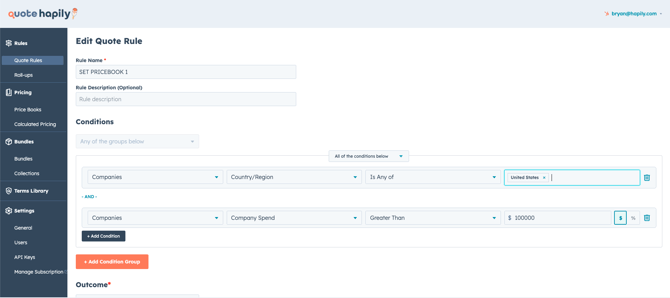

Step 3: Decide Which Should Run First
The more specific or exception-based rule should have the lower number (higher priority). In this case our second condition should have a priority of 1 because it has the exception.
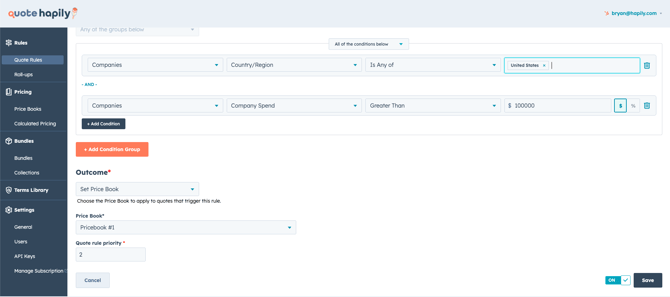
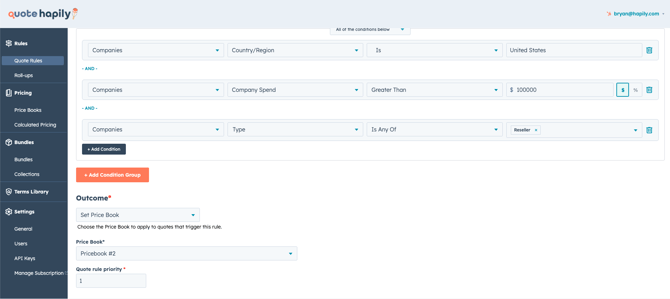
Step 4: Save both Rules and Test the Output
Generate a quote that meets both rules’ conditions. Confirm the correct one fires first when the exception is met in HubSpot.
Best Practices for Overlapping Rules
-
Specific before general — Give priority to rules with narrower conditions.
-
Use priority to chain rules intentionally when they need to build on each other.
-
When rules conflict, adjust priorities rather than rewriting both.