

Choosing how the deal amount is calculated
Pick the value Quotivity syncs to the HubSpot deal amount — TCV, ACV, ARR, MRR, or manual entry — to match how your team measures revenue.
Overview
Section titled “Overview”When a quote publishes, Quotivity writes a value back to the HubSpot deal’s amount. The Deal Amount Type setting decides which value that is. Picking the right one keeps your deal amounts, pipeline, and forecasting consistent with how your team thinks about revenue — especially for recurring or subscription deals where “the deal amount” can mean very different numbers.
The options
Section titled “The options”- Total contract value (TCV) — the full value of the contract across its entire term, including recurring and one-time charges. Best when you report on the whole signed commitment.
- Annual contract value (ACV) — the value of the contract over a single year. Useful for comparing deals of different term lengths on an annualized basis.
- Annual recurring revenue (ARR) — the recurring portion only, expressed per year. Use it when you track the ongoing subscription value and want one-time fees excluded.
- Monthly recurring revenue (MRR) — the recurring portion expressed per month. The monthly equivalent of ARR.
- Manual entry — Quotivity doesn’t calculate the amount; the rep sets the deal amount themselves. Choose this when your amounts don’t follow a single formula.
On quotes with ramp pricing, ARR and MRR are the starting (first-period) run-rate. Later ramp periods don’t add to that concurrent value — they would inflate it toward TCV. Starting and ending ARR/MRR are stored on the quote and deal separately. See How ramp pricing works.
Prerequisites
Section titled “Prerequisites”- An Admin role in Quotivity Studio
- Open Settings. In Quotivity Studio, go to Settings and choose the Quote Builder tab.
- Open the deal amount menu. In the Quoting Settings section, find
Property to set deal amount to.
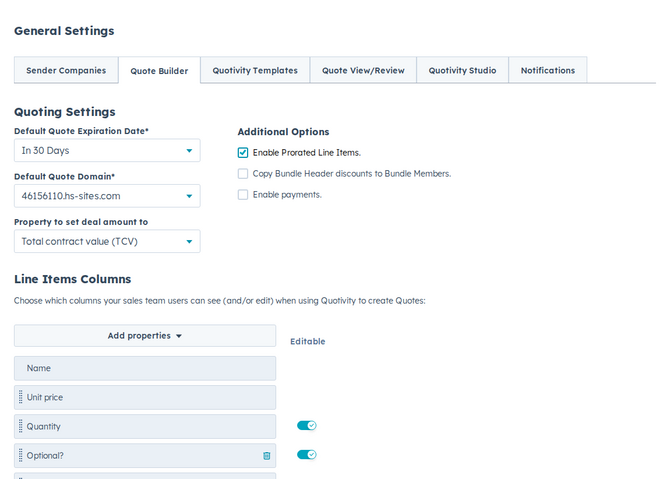
- Choose an amount type. Select the value that matches how your team measures deals — TCV, ACV, ARR, MRR, or Manual entry.
- Confirm your change saved. Settings save automatically. From now on, published quotes sync this value to the deal amount.
Examples
Section titled “Examples”- A SaaS team that forecasts on subscriptions chooses ARR so one-time onboarding fees don’t inflate the deal amount.
- A services team with mixed pricing chooses TCV to capture the full signed value of each contract.
- Match this setting to the metric your HubSpot pipeline and reports already use, so quoted deals roll up cleanly.
- Choose Manual entry only when no single calculation fits — otherwise an automatic type keeps amounts consistent across reps.
Related articles
Section titled “Related articles”Ask the help center
Answers come from these guides, with links to the articles used.
Ask anything about configuring quoting in Quotivity Studio.