

Configuring Roll-up fields
Roll-up fields aggregate line item values — count, sum, min, max, and average — into a value saved on the quote and on each bundle header.
Overview
Section titled “Overview”A Roll-up field combines values across a quote’s line items into a single value that’s saved on the quote. The same aggregation also runs per bundle and writes that per-bundle result onto each bundle header line item, using the same HubSpot property name. Use roll-ups to total a property, count line items, find a minimum or maximum, or average a value — so a single field reflects the whole quote at a glance, and each bundle header carries its own member aggregate. The saved values can then be referenced in rules, calculated pricing, and templates.
Supported aggregations
Section titled “Supported aggregations”- Count — count how many line items qualify.
- Sum — total a numeric line item property across the quote.
- Min / Max — find the smallest or largest value.
- Average — average a numeric property across line items.
The aggregation you choose pairs with a source — the line item property you’re rolling up. You can also add conditions to filter which line items the roll-up includes.
- Open Rules → Roll-ups. In Quotivity Studio, go to the Rules section and select Roll-ups.
- Click to create a roll-up. This opens the roll-up editor.
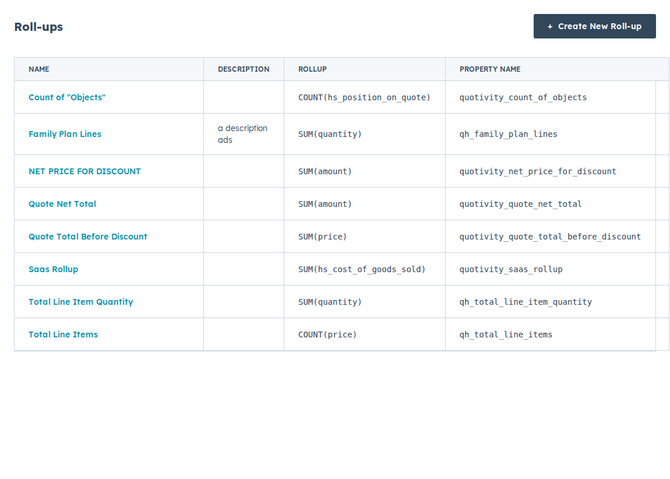
- Enter the roll-up details. Give it a label, and Quotivity generates a matching HubSpot property to store the result on the quote, the deal, and line items (for bundle headers).
- Choose the source. Pick the line item property the roll-up aggregates.
- Choose the aggregation. Select how values combine — count, sum, min, max, or average.
- Add conditions (optional). Filter which line items the roll-up includes — for example, only products of a certain type.
- Save. The roll-up now keeps its value updated on the quote (and on each bundle header) as the line items change.
Example
Section titled “Example”Create a sum roll-up over each line item’s annual value — giving you a single total-contract-value figure on the quote that updates as the rep adjusts the quote. When the quote has bundles, each bundle header also stores the sum of its own members.
- Roll-ups keep their result current as line items change, so downstream fields and reports stay accurate.
- The quote value includes every qualifying line item on the quote. The value on a bundle header includes only that bundle’s member line items (not the header itself).
- If you want the deal amount itself to reflect a particular total, review how the deal amount is calculated. See Choosing how the deal amount is calculated.
Related articles
Section titled “Related articles”Ask the help center
Answers come from these guides, with links to the articles used.
Ask anything about configuring quoting in Quotivity Studio.