

Adding line items and collections
Use the Add Line Items and Add Collection outcomes to put the right products on a quote automatically.
Overview
Section titled “Overview”Two outcomes let a rule put products on a quote for the rep. Add Line Items adds specific products you choose, and Add Collection adds an entire Collection of products at once. Use them to make sure required products, accessories, or standard bundles always make it onto qualifying quotes.
Add Line Items vs. Add Collection
Section titled “Add Line Items vs. Add Collection”- Add Line Items is best when you want one or a few specific products — for example, always include a required support plan.
- Add Collection is best when you maintain a reusable group of products together. Manage the group once as a Collection and reference it from your rule. See Organizing bundles into Collections.
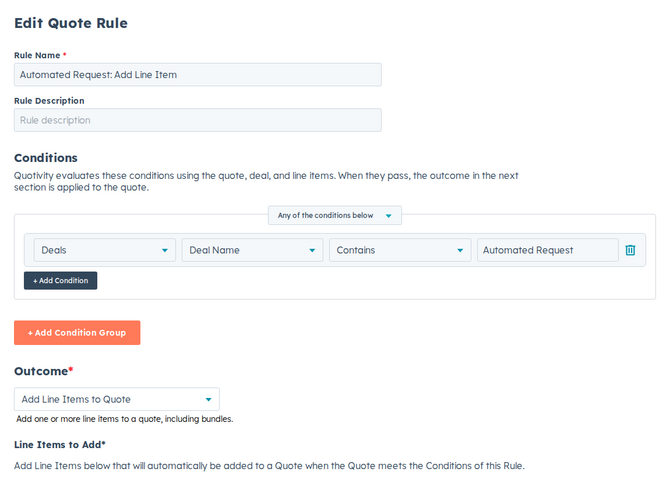
- Create a Quote Rule and set the conditions for when products should be added. See Creating a Quote Rule.
- Choose the outcome. Select Add Line Items or Add Collection.
- Pick what to add.
- For Add Line Items, choose each product and set details like quantity. On Enterprise and Legacy Pro, each column can Copy from Property (Deal, Company, Roll-up, or Flow Response). Set with Formula requires Enterprise. Trial includes both methods. The cell value is the fallback when that source is empty. Copying from Flow Response requires the same question in the rule’s conditions. Column overrides apply when the product is added; they do not rewrite the row if answers change later.
- For Add Collection, choose the Collection to add.
- Set it active and save. Matching quotes now include the products automatically.
Make sure products are in the price book
Section titled “Make sure products are in the price book”Products added by a rule must exist in the quote’s selected price book so they can be priced. If a product isn’t in that price book, it can’t be added. Confirm your added products and collections live in the price books your quotes use.
Add Collection is all-or-nothing. If any product in the collection is outside the quote’s price book, the rule adds none of them and Quote Builder shows Could not add the collection products. One or more of the products is not in this price book. The same check applies when a rep adds the collection from Quote Builder’s Collections tab — every collection still appears in that list, even ones that will fail. See How Collections work with Price Books.
On Enterprise, Add Line Items that adds a bundle using inherit-quote (dynamic) pricing also needs the quote to have an assigned price book. Without one, the rule does not add the bundle and Quote Builder shows that dynamic pricing requires a price book. See How bundle pricing works.
If a product was deleted or archived in HubSpot
Section titled “If a product was deleted or archived in HubSpot”Add Line Items and Add Collection need live HubSpot products. If someone deletes or archives a product after you save the rule, Quotivity cannot add it to the quote. The rule shows an error such as HubSpot product not found. Restore the product in HubSpot, or edit the rule to use a product that still exists.
Example
Section titled “Example”When a hardware product is on the quote, use Add Line Items to include the required mounting kit — so it’s never forgotten and always priced from the same catalog.
- Pair Add Collection with a clear condition so the right bundle of products lands on the right quotes.
- If a rule-added product isn’t appearing, check that it’s part of the price book the quote is using, and that the product still exists in HubSpot (not deleted or archived).
Related articles
Section titled “Related articles”Ask the help center
Answers come from these guides, with links to the articles used.
Ask anything about configuring quoting in Quotivity Studio.