

Adding add-on and swap products
Use Quote Rules to drop an add-on into a configured bundle or swap one option product for an alternate.
Overview
Section titled “Overview”Once a bundle expands on a quote, you can have Quote Rules adjust what’s inside it automatically. Two outcomes work on a configured bundle:
- Add an add-on. A rule can add one or more add-on option products across one or more add-on options on a bundle that was just expanded — for example, automatically including premium support add-ons when the deal qualifies.
- Swap a product. A rule can replace products on one or more included options with alternates — for example, swapping standard components for upgraded ones when conditions are met. Each included option gets one alternate product.
Both happen as the bundle expands, so the rep ends up with the right configuration without doing the work by hand.
How it works
Section titled “How it works”These adjustments are configured as Quote Rule outcomes, not on the bundle itself. You set the conditions that should trigger the change, then choose the add or swap outcome and select the bundle options and products to add or swap.
Because the rule runs as the bundle expands, the add-on or swapped products land in the bundle alongside its other members and prices the same way the rest of the bundle does.
Setting it up
Section titled “Setting it up”- Build the bundle first. Make sure the bundle has the option products you want to add or swap to, and that it’s active. See Configuring bundle options.
- Create a Quote Rule. Set the conditions that should trigger the add or swap.
- Choose the add or swap outcome. Point the outcome at the bundle and one or
more options and products to add or swap. Once saved, the rule applies the
next time a rep adds that bundle to a quote.
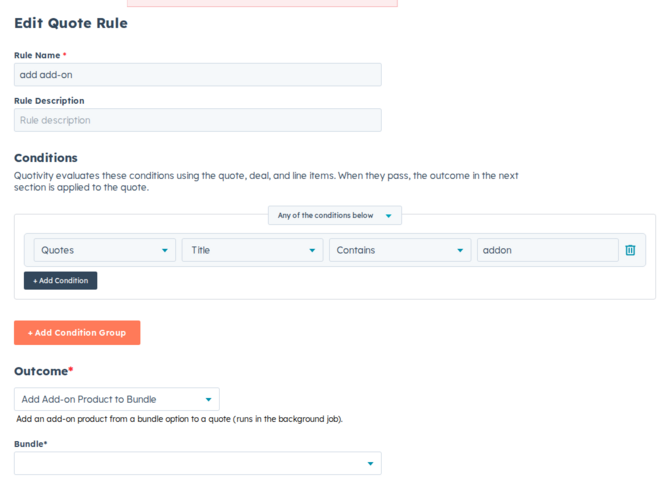
For the full walkthrough of configuring these outcomes, see Swapping and adding bundle products.
Example
Section titled “Example”A rule watches for deals over a certain size and, when a qualifying bundle expands, swaps its standard onboarding option for premium onboarding and adds a dedicated-support add-on — all before the rep touches the quote.
Related articles
Section titled “Related articles”Ask the help center
Answers come from these guides, with links to the articles used.
Ask anything about configuring quoting in Quotivity Studio.