

Prompting the rep for input
Use the Prompt User outcome to ask reps for missing properties or file uploads before a quote can continue.
Overview
Section titled “Overview”The Prompt User outcome asks the rep to supply something before the quote moves forward. Use it to collect missing property values or required file uploads — the details you need captured on every qualifying quote, gathered right in Quote Builder.
What you can ask for
Section titled “What you can ask for”- Deal properties: prompt the rep to fill in deal fields that are otherwise blank — for example, an implementation date or a billing contact.
- Quote fields: prompt the rep to fill in custom quote fields. HubSpot’s standard quote fields, fields Quotivity creates, and roll-up fields are not available.
- Files: ask the rep to upload documents, such as a signed order form, with a short description so they know what to attach.
- Create a Quote Rule and set the conditions for when the prompt should appear. See Creating a Quote Rule.
- Choose the Prompt User outcome. Select Prompt User as the rule’s outcome.
- Add the properties to request. Choose each deal property or custom quote field the rep must provide.
- Add any required file uploads. For each one, write a description that
tells the rep what to attach.
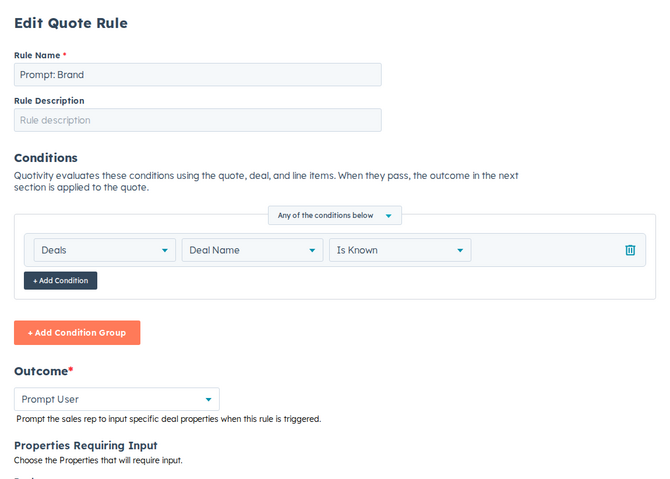
- Set it active and save. When a matching quote appears, the rep is prompted to provide the requested details before continuing.
Example
Section titled “Example”When a quote includes a regulated product, prompt the rep to upload a compliance document and fill in the customer’s license number — so nothing ships without the paperwork.
- Keep prompts focused. Asking for only what you truly need keeps reps moving.
- If the quote or deal already has a value, the prompt shows it. The field stays empty only when that value is actually blank.
- Values a rep enters here can feed other rules — for instance, an Update line items rule can copy a prompted value onto line items. See Updating line items automatically.
Related articles
Section titled “Related articles”Ask the help center
Answers come from these guides, with links to the articles used.
Ask anything about configuring quoting in Quotivity Studio.