

Swapping and adding bundle products
Use Quote Rules to add an add-on product to newly built bundles or swap a bundle option product for an alternate.
Overview
Section titled “Overview”Quote Rules can adjust bundles as reps build quotes — adding an extra product to new bundles, or substituting one option product for another based on your conditions. This makes sure the right option products land on bundles automatically.
What a rule can do to a bundle
Section titled “What a rule can do to a bundle”- Add an add-on. A rule can add one or more add-on option products to a bundle, across one or more add-on options. It applies to newly built (expanded) instances of the bundle, so each fresh bundle a rep adds picks up the add-ons. When an add-on option allows multiple products, you can select more than one product for that option.
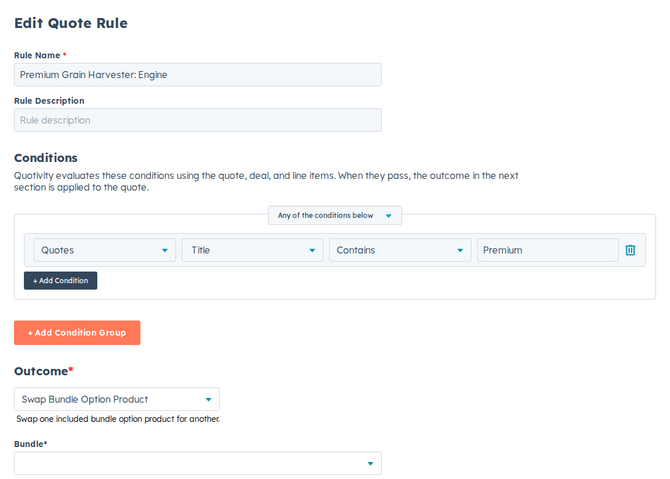
- Swap a product. A rule can replace products on one or more included options with alternates you choose — handy when a condition calls for a different variant or replacement. Each included option can have one alternate product.
- Create a Quote Rule and set the conditions for when the bundle change should apply. See Creating a Quote Rule.
- Choose the add or swap outcome.
- Choose the bundle and options.
- To add add-ons, pick the bundle, then one or more add-on options and the products to include for each. Options that allow multiple products let you select more than one product.
- To swap, pick the bundle, then one or more included options and the
alternate product for each.
- Set it active and save. Matching quotes now add or swap the bundle products automatically.
Example
Section titled “Example”When a customer qualifies for premium support, use a swap outcome to replace the standard support option in your service bundle with the premium one — no manual reconfiguration on each quote.
- Define your bundles’ options and their add-on and swap products first, so your rules have the right pieces to reference. See Adding add-on and swap products.
- The add-on outcome targets new bundle instances, so it’s a good fit for “always include this with the bundle” policies.
Related articles
Section titled “Related articles”Ask the help center
Answers come from these guides, with links to the articles used.
Ask anything about configuring quoting in Quotivity Studio.