

Quote Builder settings
Tour the Quote Builder settings that shape what your reps and buyers experience on every quote.
Overview
Section titled “Overview”The Quote Builder settings control the defaults and behaviors that apply to every quote your reps build. From here you decide how quotes expire, where they’re published, how the deal amount syncs to HubSpot, and which line item details reps and buyers see. This article tours each option and points you to the deeper how-to when there’s more to it.
Where to find it
Section titled “Where to find it”In Quotivity Studio, open Settings → Quoting → General Quote Settings. Changes save automatically as you make them.
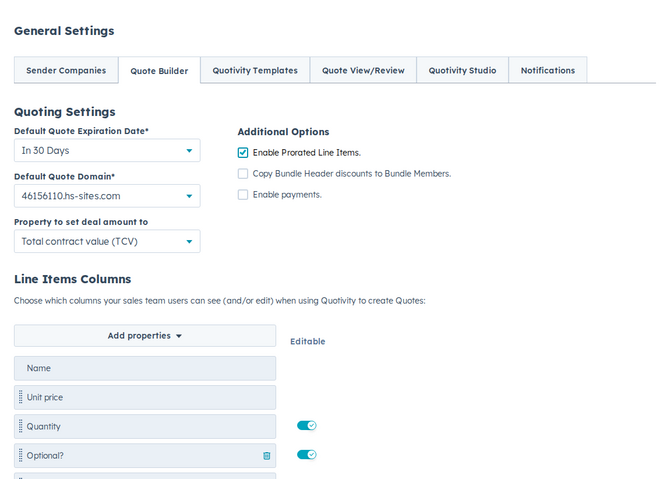
The settings
Section titled “The settings”Default Quote Expiration Date
Section titled “Default Quote Expiration Date”Sets how long a new quote stays valid — 30, 60, 90, 120, 180, or 365 days from when it’s created. Reps can still adjust an individual quote, but this is the starting point. See Setting quote expiration and default domain.
Default Quote Domain
Section titled “Default Quote Domain”The domain your published HubSpot-template quotes are served from, so buyers open them on a URL that looks like you. New quotes start with this domain. If a quote still has no domain when a rep publishes it, Quotivity uses this default. Only domains that are set up and secured appear in the list. See Setting quote expiration and default domain.
Property to set deal amount to (Deal Amount Type)
Section titled “Property to set deal amount to (Deal Amount Type)”Controls which value Quotivity writes back to the HubSpot deal’s amount — TCV, ACV, ARR, MRR, or Manual entry. This keeps your deal amounts consistent with how your team measures revenue. See Choosing how the deal amount is calculated.
Quote owner assignment
Section titled “Quote owner assignment”Choose who Quotivity sets as the quote owner when a new quote is created: Deal owner or Quote creator. That person is also the sender printed on the quote — name, job title, email, and phone. Changing the quote owner later updates those sender fields. The sender company (name, address, and logo) stays on the selected sender company. The quote owner receives approval request notifications and is notified when a quote is approved or rejected.
Enable Prorated Line Items
Section titled “Enable Prorated Line Items”Adjusts the cost of recurring line items based on timing, so a buyer pays only for the portion of a billing period they’ll actually use. Defaults to on. Uncheck it to charge the full billing period even when the term is shorter. See Optional and prorated line items.
Enable Ramp Pricing
Section titled “Enable Ramp Pricing”(Enterprise) Shows the ramp control next to Discount in Quote Builder so reps can configure multi-period contracts. Defaults to on. Uncheck it to hide the button. Existing ramps stay on quotes; reps cannot open Configure Ramp Pricing until you turn this back on. See Configuring ramp pricing on a quote.
Enable quote payments
Section titled “Enable quote payments”Lets buyers pay when they accept a quote, so you can collect a deposit or full payment at acceptance instead of invoicing afterward. Requires HubSpot Payments or Stripe set up in your portal. See Enabling quote payments.
Save published, accepted, and signed quote PDFs to the deal
Section titled “Save published, accepted, and signed quote PDFs to the deal”Saves the quote PDF on the HubSpot deal when a quote is published, when it is
accepted without a signature, and when it is signed. Defaults to on. The
published file is named quote-{quote number}-YYYYMMDD-HHMM.pdf. Accepting a
quote that does not require a signature saves
accepted-quote-{quote number}-YYYYMMDD-HHMM.pdf. The signed file, including a
written signature, is named signed-quote-{quote number}-YYYYMMDD-HHMM.pdf.
The time is the account time zone. The file shows in the deal’s Attachments.
Uncheck the setting to stop saving new PDFs. Files already on the deal stay
there. A quote that is not on a deal is skipped, and saving the same PDF again
does not add a duplicate of that file.
Allow deleting accepted or signed quotes
Section titled “Allow deleting accepted or signed quotes”Shows Delete on accepted and signed quotes on the HubSpot deal’s Quotivity Quotes card. Defaults to off. Leave it off unless your team needs to remove those quotes — deleting cannot be undone. Change and renewal quotes stay undeletable. The Quotivity Contract card still hides Delete on accepted and signed quotes.
Unpublish quotes immediately after signing or acceptance
Section titled “Unpublish quotes immediately after signing or acceptance”Takes the Quotivity HTML page and its PDF offline once every signer has signed, or the quote is accepted. Defaults to off, so both stay up until the quote expires. Unlike expiration, which still leaves the PDF available, this takes the PDF down too. The HubSpot quote stays Signed or Accepted. A quote that is only partly signed stays published. Quotes that were already signed stay up until the next time one is fully signed or accepted.
Enable Bundle Configurator for all users
Section titled “Enable Bundle Configurator for all users”(Enterprise) Turns on the guided Configure Bundle panel for every rep, instead of waiting for each person to opt in from the Quote Builder banner. See How the Bundle Configurator works.
Contracts
Section titled “Contracts”This section lives on Settings → Quoting → Contracts, and appears only when contracts are enabled for your account. The page is tagged Beta.
Create a contract when a quote is accepted controls automatic contract creation for new-business quotes and defaults to on. Turning it off does not stop an accepted change or renewal quote from completing its update to an existing contract. See Creating contracts from accepted quotes.
If the settings are greyed out, follow Authorizing HubSpot contract access.
Under Contract Renewals, choose the Renewal deal pipeline and Renewal deal stage for deals that Quotivity creates with renewal quotes. If you leave them unset, Quotivity uses the default pipeline’s first stage. See Renewing a contract.
Line Items Columns
Section titled “Line Items Columns”Choose which line item columns reps see (and can edit) in Quote Builder, and which columns appear when you manage Collections and Bundles in Studio. These columns are configured on the separate Settings → Quoting → Line Item Table Columns page. See Configuring line item columns.
- Settings here apply account-wide, so a change affects every rep’s next quote.
- You don’t need to set everything at once — start with expiration, domain, and deal amount type, then refine columns and the optional toggles later.
Related articles
Section titled “Related articles”Ask the help center
Answers come from these guides, with links to the articles used.
Ask anything about configuring quoting in Quotivity Studio.