

Building your Terms Library
Create reusable terms-and-conditions text once and reuse it whenever you build a quote.
Overview
Section titled “Overview”Your Terms Library is where you write and store reusable terms-and-conditions text. Instead of pasting legal language into every quote, you create each set of terms once, then attach it to templates or apply it with a Quote Rule. Keeping terms in one place means an update happens in a single spot and flows through to the quotes that use it.
Prerequisites
Section titled “Prerequisites”- An Admin role in Quotivity Studio
- Open the Terms Library. In Quotivity Studio, select Terms Library from
the left menu. Any terms you’ve already created appear here.
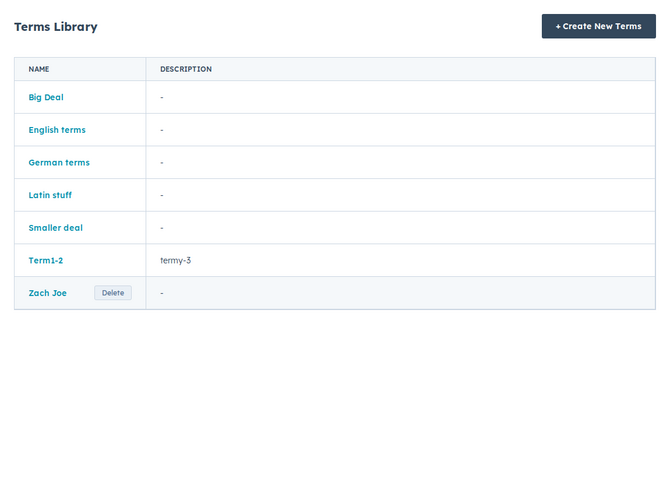
- Create a new set of terms. Click + Create New Terms and give it a clear name in Terms Name — for example, Payment Terms Monthly or Standard MSA.
- Add a description. Use the optional Terms Description field for internal notes so you and your team can tell at a glance what each set covers.
- Write the terms content. In Terms Content, enter the actual terms-and-conditions language. You can format it with bold, italics, bullet points, and links. This is the content that appears on the quote.
- Save. Click Save to store the terms.
Your saved terms are now available to attach to templates or apply with a Quote Rule.
Examples
Section titled “Examples”- A Standard MSA set of terms attached to your default quote template, so every standard quote carries the same master agreement language.
- A separate EU data processing set of terms applied by a Quote Rule when the buyer’s country is in the EU.
- Keep each set of terms focused on one purpose so you can mix and match them per quote.
- Use clear names — they’re how your team picks the right terms later. A category prefix like Payment - or Shipping - keeps similar terms grouped together.
- Review your terms periodically so the saved language stays current.
Related articles
Section titled “Related articles”Ask the help center
Answers come from these guides, with links to the articles used.
Ask anything about configuring quoting in Quotivity Studio.