

Setting a price book with a rule
Use the Set Price Book outcome to choose the quote's pricing context automatically before products are priced.
Overview
Section titled “Overview”The Set Price Book outcome selects which price book a quote uses. Because it runs before products are priced, the list prices reps see come from the price book you intend — no manual selection, no mismatched pricing. Use it to apply the right catalog based on the customer, region, deal type, or quote type. A condition on the quote itself can use only the properties already filled in when the quote is created. See Quote properties available to Set Price Book rules.
How Quotivity chooses the price book
Section titled “How Quotivity chooses the price book”A Set Price Book rule is one of several sources Quotivity checks when a quote is created. Quotivity works down this list and uses the first valid price book it finds:
- A price book already on the quote (skipped past if empty).
- A matching Set Price Book rule. Lowest priority number wins; a blank priority is treated as 0.
- The contract’s price book, on a change or renewal quote — the book used by the quote that created the contract.
- A price book inferred from non-bundle line items already on the deal, only when they all point at exactly one book.
- The price book assigned to the deal (Enterprise).
- The price book assigned to the company (Enterprise).
- The account’s only price book, if exactly one exists.
A matching rule wins over a deal or company assignment, but not over a book already stored on the quote. On a change or renewal quote, a rule still wins over the contract’s price book; without a matching rule the quote keeps the contract’s book. Rule, contract, deal, and company assignments lock the book so the rep cannot switch it.
- Create a Quote Rule and set the conditions that should determine the pricing context — for example, the customer’s region or segment. See Creating a Quote Rule.
- Choose the Set Price Book outcome. Select Set Price Book as the rule’s outcome.
- Pick the price book. Choose the price book this rule should apply.
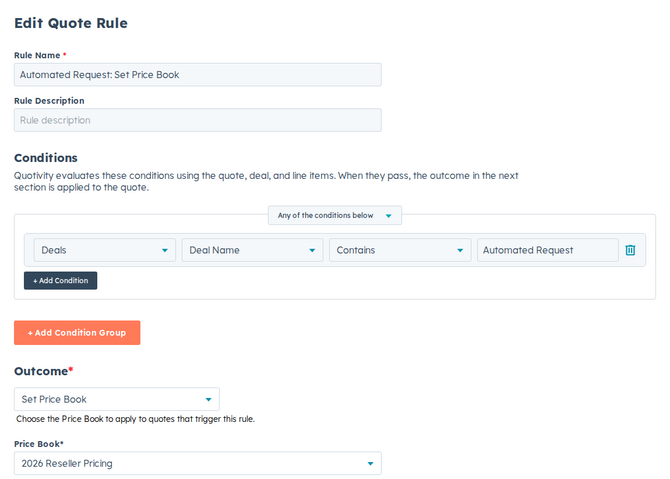
- Set it active and save. Matching quotes now use the selected price book, so products are priced from that catalog the moment they’re added.
Example
Section titled “Example”For European deals, set a condition on the customer’s region and use Set Price Book to apply your EU price book — so prices, currency, and adjustments all match the region automatically.
- Give price-book rules clear priorities so it’s obvious which one wins when more than one could apply.
- Set Price Book is about which catalog applies. To define the prices themselves, work in the price book. See How Price Books work.
Related articles
Section titled “Related articles”Ask the help center
Answers come from these guides, with links to the articles used.
Ask anything about configuring quoting in Quotivity Studio.