

Enabling quote payments
Let buyers pay when they accept a quote by turning on payments in Quote Builder settings.
Overview
Section titled “Overview”With quote payments enabled, buyers can pay at the moment they accept a quote — a deposit or the full amount — instead of waiting for a separate invoice. This shortens the gap between “yes” and “paid” and gives you a cleaner finalization step. Quotivity processes payments through your existing HubSpot Payments or Stripe setup. Payments are off by default; you turn them on in Quote Builder settings.
Prerequisites
Section titled “Prerequisites”- An Admin role in Quotivity Studio
- Your HubSpot portal set up to process payments — either HubSpot Payments or a connected Stripe account as your payment processor
- Open Settings. In Quotivity Studio, go to Settings and choose the Quote Builder tab.
- Find the Additional Options group. Look in the Quoting Settings
section.
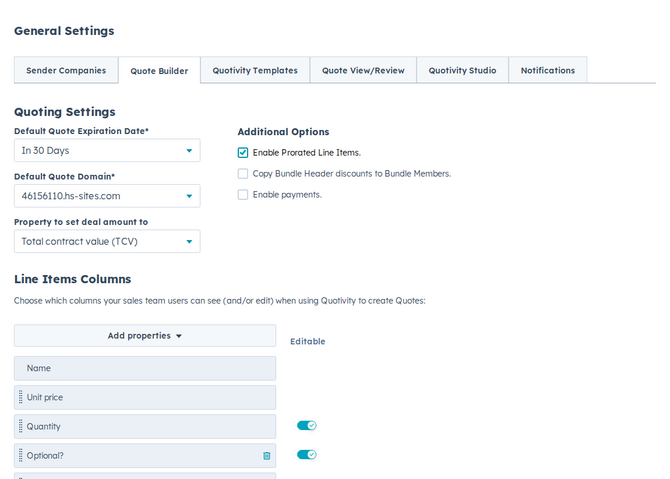
- Turn on Enable quote payments. Check Enable quote payments.
- Confirm your change saved. Settings save automatically. Buyers can now pay when they accept a quote.
Examples
Section titled “Examples”- A team that requires a deposit before work begins enables payments so buyers pay at acceptance, removing a manual invoicing step.
- Payments collect during the buyer’s finalization step, right when they accept — see how that fits the bigger picture in The quote lifecycle explained.
- Recording a paper or offline deposit in HubSpot only tracks money received. It does not accept a written-signature quote or emit Quote signed. Use Mark as Accepted for that — see Marking a written-signature quote as accepted.
Related articles
Section titled “Related articles”Ask the help center
Answers come from these guides, with links to the articles used.
Ask anything about configuring quoting in Quotivity Studio.