

Showing a notification
Use the Notify outcome to surface a message to the rep — a reminder or heads-up — without stopping the quote.
Overview
Section titled “Overview”The Notify outcome shows the rep a message while letting them continue working. It’s the gentle option: a reminder, a heads-up, or a suggestion that doesn’t need to stop the quote.
When to use it
Section titled “When to use it”Use Notify when you want to inform, not enforce. If the situation should stop the quote, use Blocking a quote instead; if it needs a sign-off, use Requiring approval.
- Create a Quote Rule and set the conditions that should trigger the message. See Creating a Quote Rule.
- Choose the Notify outcome. Select Notify as the rule’s outcome.
- Write the message. Keep it short and useful — the rep will see it and
keep going.
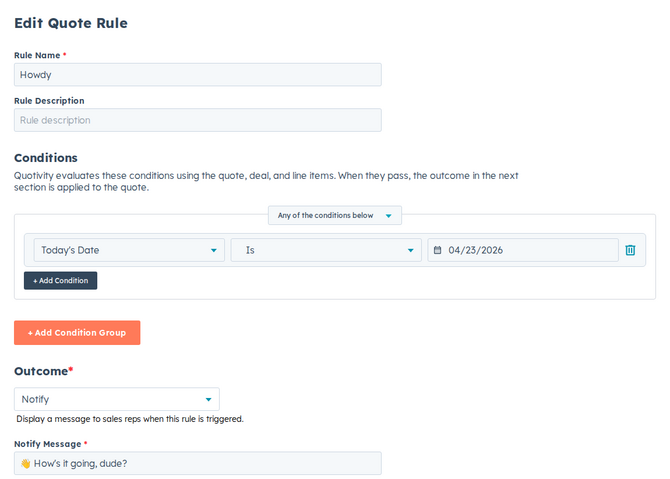
- Set it active and save. When a matching quote appears, the rep sees your message and can continue.
Example
Section titled “Example”To remind reps about a promotion: set a condition for a qualifying product category and use Notify with a message like “This category qualifies for the spring promo — consider adding the bundle discount.”
- Notifications inform; they don’t enforce. If reps keep ignoring an important one, consider Block or Require Approval instead.
Related articles
Section titled “Related articles”Ask the help center
Answers come from these guides, with links to the articles used.
Ask anything about configuring quoting in Quotivity Studio.