

Setting price book effective dates
Schedule when a price book's prices take effect, so a price change goes live exactly when you plan it.
This feature requires an Enterprise plan.
Overview
Section titled “Overview”Effective dates let you schedule when a price book’s pricing applies. Instead of swapping prices manually at midnight on launch day, you set the dates and let Quotivity apply the right pricing at the right time — handy for annual price increases, seasonal pricing, or a promotion with a fixed window.
Prerequisites
Section titled “Prerequisites”- A price book with the pricing you want to schedule — see Creating a Price Book
- Open Pricing → Price Books. From the Quotivity Studio sidebar, go to Pricing, select Price Books, and open the book you want to schedule.
- Set the effective dates. Fill in the Effective Start Date and, if the
book should stop after a set window, the Effective End Date. Both fields are
optional — leave them blank and the book is always effective. The end date must
be after the start date.
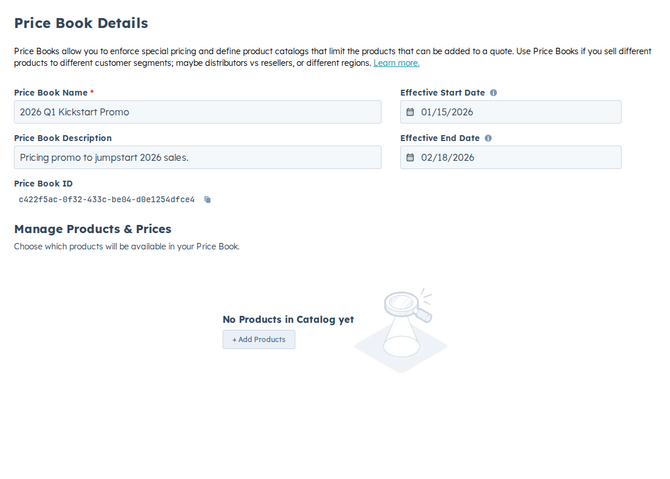
- Save. Save your changes.
The price book’s pricing now applies within the window you set, so the change goes live on the date you planned. Only currently active books show up in Quote Builder — expired or future-dated books are filtered out — and a Set Price Book rule skips a book that’s outside its effective window, moving on to the next matching rule.
Example
Section titled “Example”You’re raising prices for the new fiscal year. Clone your current book, update the prices, and set the new book to take effect on January 1. Quotes before that date keep the old pricing; quotes on or after it pick up the new prices automatically.
- To stage a price change cleanly, clone the current book, adjust the prices, and schedule the copy — see Cloning a Price Book.
- Double-check the start date and time zone before a launch so pricing flips exactly when you intend.
Related articles
Section titled “Related articles”Ask the help center
Answers come from these guides, with links to the articles used.
Ask anything about configuring quoting in Quotivity Studio.