

How bundle pricing works
Understand where the three parts of a bundle — the header, included products, and add-ons — get their prices.
Overview
Section titled “Overview”A bundle’s price comes from three parts, each priced its own way. Knowing where each part gets its price helps you set bundle prices that add up correctly on the quote.
The three parts
Section titled “The three parts”- Bundle header product. The header sets the base price for the bundle and is priced from the quote’s price book, just like any other product.
- Included bundle products. Included products are priced as the additional cost above the header. Because their cost is usually folded into the header price, included products often price at $0.
- Add-on bundle products. Add-ons are priced independently, using the price set on the option’s products in the bundle definition. They can support quantity adjustments and volume pricing.
On Enterprise, bundle options can instead inherit the quote’s price book (dynamic pricing) rather than using prices set in the bundle definition. Those bundles require the quote to have an assigned price book. If a rep creates a quote from a deal that already has such a bundle, and the quote has no price book, Quotivity leaves the bundle off the quote and shows that dynamic pricing needs a price book. Assign a price book, then add the bundle again. Quote Builder also blocks adding those bundles from the product library when the quote has no price book.
Prerequisites
Section titled “Prerequisites”- An Admin role in Quotivity Studio
- A bundle with its options and option products already set up
Setting prices
Section titled “Setting prices”- Open the bundle. In Quotivity Studio, go to Configurable Products →
Bundles and open the bundle whose pricing you want to set.
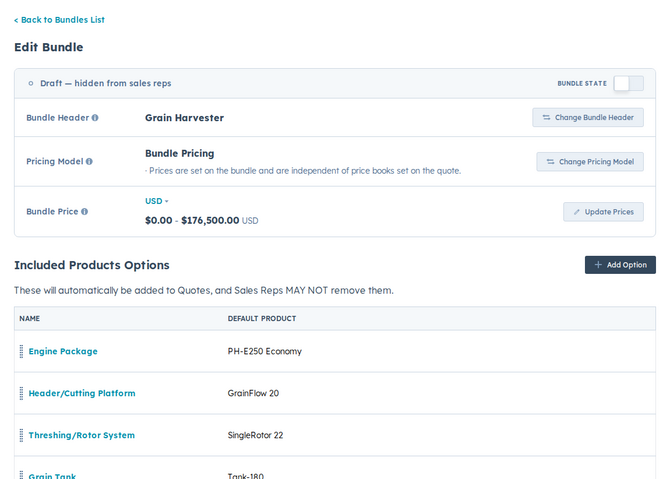
- Price the header from a price book. The header takes its price from the quote’s price book, so make sure the header product is priced there. See How Price Books work.
- Set included product prices. Give each included option product the additional cost it should add above the header — often $0 when the cost is already in the header price.
- Set add-on product prices. Give each add-on option product its own price. Add-ons price independently of the header.
- Verify on a test quote. Add the bundle to a test quote and confirm each part prices the way you expect before reps use it.
When the header, included products, and add-ons all price correctly on a test quote, the bundle is ready.
Example
Section titled “Example”You sell a platform bundle priced at a flat $5,000 from your price book. The header carries that $5,000, the included plan and support products are set to $0 since they’re covered by the header, and an optional onboarding add-on is priced independently at $1,500 so it only adds to the total when a rep selects it.
- Keep included products at $0 when the header already covers their cost, so the bundle total matches the header price.
- Bundle structure (header, options, defaults, quantities) can be managed in bulk by CSV import, but pricing is set separately — the bundle import CSV does not set pricing. See importing bundles.
Related articles
Section titled “Related articles”Ask the help center
Answers come from these guides, with links to the articles used.
Ask anything about configuring quoting in Quotivity Studio.