

Using multiple sender companies
Send quotes from more than one business entity, and let a Quote Rule pick the right sender automatically.
This feature requires an Enterprise plan.
Overview
Section titled “Overview”If your team quotes under more than one business — a US entity and an EU entity, say, or separate brands — you can set up several sender companies and choose which one a given quote uses. A Quote Rule can even pick the sender automatically based on conditions you define, so reps never have to think about it.
Prerequisites
Section titled “Prerequisites”- An Admin role in Quotivity Studio
- At least one sender company already configured — see Setting up Sender Companies
- Open Settings → Sender Companies. Your existing sender companies appear in the list.
- Click Create Sender Company for each additional entity you need, and fill
in its name, address, and branding.
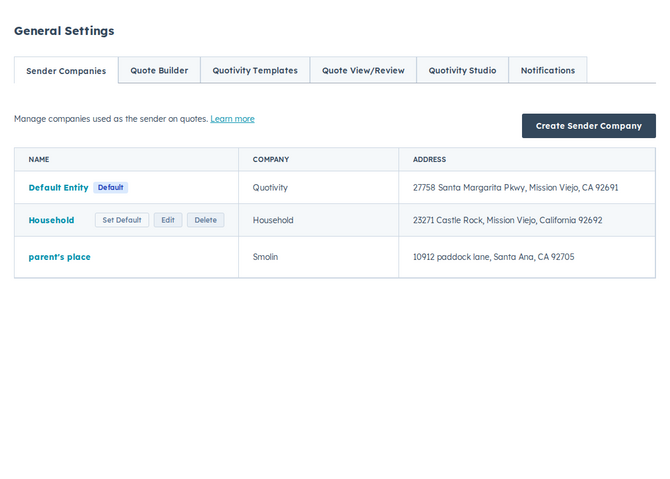
- Set the right default. Hover over the company you want as the fallback and click Set Default. Quotes use this account default unless a user has their own default or a rule sets a different one.
- Set a default per user when one company is usually enough. On Settings → Users, choose a Default Sender Company for each person who should start quotes with a specific entity. That value is applied when they create a quote, before rules run. See Managing users.
- Let a Quote Rule choose the sender. Create or edit a rule, add a condition that identifies which quotes belong to which entity, and set its outcome to use that sender. A matching rule still overrides the user or account default. See Setting the template, terms, language, or sender.
- Test a quote. Build a quote that matches your rule’s conditions and confirm the correct company appears as the sender on the document.
Examples
Section titled “Examples”- A company selling in North America and Europe sets up a US and an EU sender, then writes a rule that applies the EU sender whenever the deal’s country is in Europe.
- A team whose reps usually quote for one brand each sets a Default Sender Company on each user instead of writing a rule just to pick the sender.
- An agency operating two brands keeps one sender per brand and routes quotes by the product line on the deal.
Related articles
Section titled “Related articles”Ask the help center
Answers come from these guides, with links to the articles used.
Ask anything about configuring quoting in Quotivity Studio.