

Authorizing HubSpot contract access
Grant Quotivity the HubSpot contract permissions it needs, then reinstall.
Contracts are enabled per account. Your HubSpot portal must have access to the Contracts API beta, and Quotivity must enable contracts for your account. Contact help@quotivity.com to get set up.
Contract settings stay unavailable until HubSpot has granted two things: access to the Contracts API public beta, and permission for Quotivity to use contract data. Do them in that order. Reinstalling before the permissions are enabled does not unlock the settings.
You need a HubSpot user who can manage connected apps.
Request access to the public beta
Section titled “Request access to the public beta”- In Quotivity Studio, open Settings → Quoting → Contracts.
- Click opt in to the HubSpot Contracts API beta and request access.
The rest of the page stays greyed out until HubSpot approves the request and you finish the steps below.
Authorize contract permissions
Section titled “Authorize contract permissions”Turn on contract permissions from HubSpot’s approved apps list. Settings → Quoting → Contracts links to that list
for your account. You can also open this address and replace PORTAL_ID with your HubSpot account ID:
https://app.hubspot.com/connected-apps/PORTAL_ID/approved-apps
-
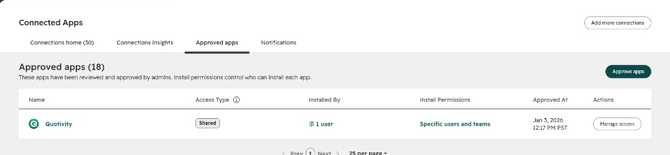
Find Quotivity in the list.
-
Click Manage access on the right side of that row. Do not click the app name. The name opens a different page.
-
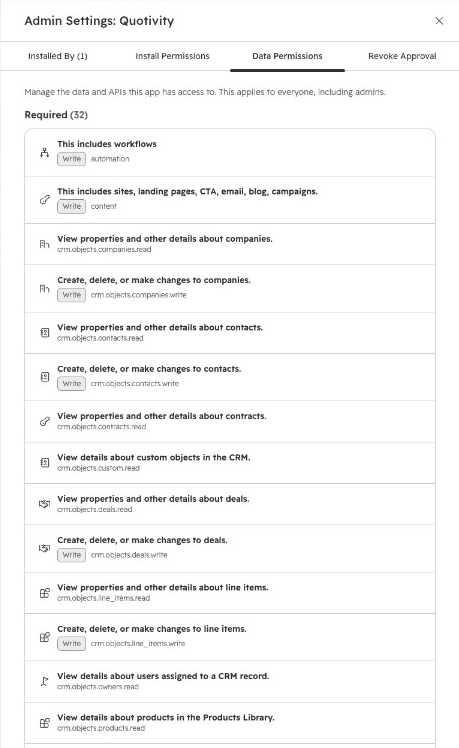
Open the Data Permissions tab. It is the third tab.
-
Scroll to the bottom. Under Conditionally required, next to Enable, click All, then save.
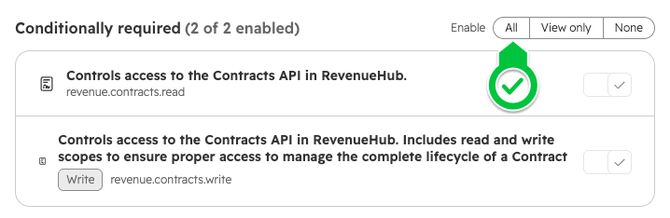
Both contract rows show as enabled.
Reinstall Quotivity
Section titled “Reinstall Quotivity”- Return to Quotivity Studio → Settings → Quoting → Contracts.
- Click Reinstall and approve the contract permissions HubSpot asks for.
The contract settings are available. You can turn Create a contract when a quote is accepted on or off, and choose where renewal deals land.
Related articles
Section titled “Related articles”Ask the help center
Answers come from these guides, with links to the articles used.
Ask anything about configuring quoting in Quotivity Studio.